What Does OTG Mean in Text? Meaning, Origin & How to Use It
What Does OTG Mean in Text? “OTG” in texting most commonly stands for “On The Go,” meaning someone is currently out and about, busy, or in transit — for example, “Can’t talk now, I’m OTG.”
It signals that the person is active outside their home or away from their desk, often replying briefly or on the move.
Less commonly, OTG can also mean “Off The Grid,” used when someone is unreachable, unplugging from technology, or going somewhere remote without phone service.
The meaning depends on context: if someone says it before heading out, it usually means “on the go.” If they’re disappearing for a while, it likely means “off the grid.”
Table of Contents
Quick Table
| Term | Meaning | Example Use |
|---|---|---|
| OTG (most common) | On The Go | “Can’t talk, I’m OTG right now” |
| OTG (less common) | Off The Grid | “Going OTG for the weekend, no signal” |
| Context clue | Before heading out → On The Go | “Heading out, OTG in 5” |
| Context clue | Disappearing/unreachable → Off The Grid | “Going OTG, see you Monday” |
How I First Discovered What OTG Really Means
So here’s what happened. I was texting my cousin about a USB drive I needed to plug into my Android phone, and he replied “yeah just get an OTG cable, problem solved.”
I stared at that text for a solid minute thinking he’d sent me a typo or some new slang I hadn’t caught onto yet.
Turns out it wasn’t slang at all. It was something way more useful than I expected, and once I understood it, I realized I’d actually owned one of these things for years without knowing what it was called.
If you landed here because someone texted you “OTG” and you’re scratching your head, you’re not alone. Let me break this down the way my cousin broke it down for me — no tech-bro jargon, just plain talk.
So What Does OTG Actually Mean?
OTG stands for “On-The-Go.” In tech terms, it usually refers to USB OTG — a feature that lets your phone or tablet connect directly to other devices like USB drives, keyboards, mice, or even cameras, without needing a computer in between.
Basically, it turns your phone into a mini host device. Instead of your phone just being the thing that gets plugged into stuff, it becomes the thing other stuff plugs into.
Now, here’s where it gets a little confusing — and I made this mistake myself early on. People also use “OTG” casually in texting to mean “on the go,” like “I’ll call you back, I’m OTG right now.” So context matters a lot here.
Wait, Two Different Meanings?
Yeah, exactly. This tripped me up the first time too.
USB OTG (the tech one) This is about a cable or adapter that lets your phone connect to external devices.
“On The Go” (the casual texting one) This is just someone saying they’re busy, out and about, or multitasking. Like “sent that email OTG from my car.”
When my cousin texted me about the cable, he obviously meant the tech version because we were literally talking about plugging in a flash drive. But if a friend texts “can’t talk, OTG,” they just mean they’re out and about.
The trick is reading the sentence around it. If it’s near words like cable, adapter, USB, connect, or plug — it’s almost always the tech meaning. If it’s near words like busy, running errands, out, or driving — it’s the casual one.
My First Real Experience With USB OTG
About two years ago, I needed to transfer around 400 photos from a USB flash drive to my Android phone because my laptop had decided to die on me right before a trip (classic timing, right?).
I had zero idea this was even possible without a computer. My cousin showed up with this tiny cable — looked like a regular USB cable but with a smaller connector on one end — and said, “this is an OTG cable, just plug it in.”
I genuinely thought he was messing with me. But I plugged the flash drive into one end and the smaller end into my phone’s charging port, and within seconds, my phone literally asked if I wanted to open the file manager to view the USB contents.
That moment kind of blew my mind a little. I’d been carrying around a phone capable of doing this the whole time.
How USB OTG Actually Works (Without the Tech-Manual Language)
Here’s the simple version. Your phone’s charging port (USB-C or Micro-USB depending on how old your device is) can sometimes act like a regular computer USB port — but only if your phone supports OTG and you have the right cable or adapter.
Most phones made in the last 6-7 years support it. Older budget phones sometimes don’t, which is something to check before you buy a cable and get disappointed.
Step-by-Step: How I Use OTG With My Phone
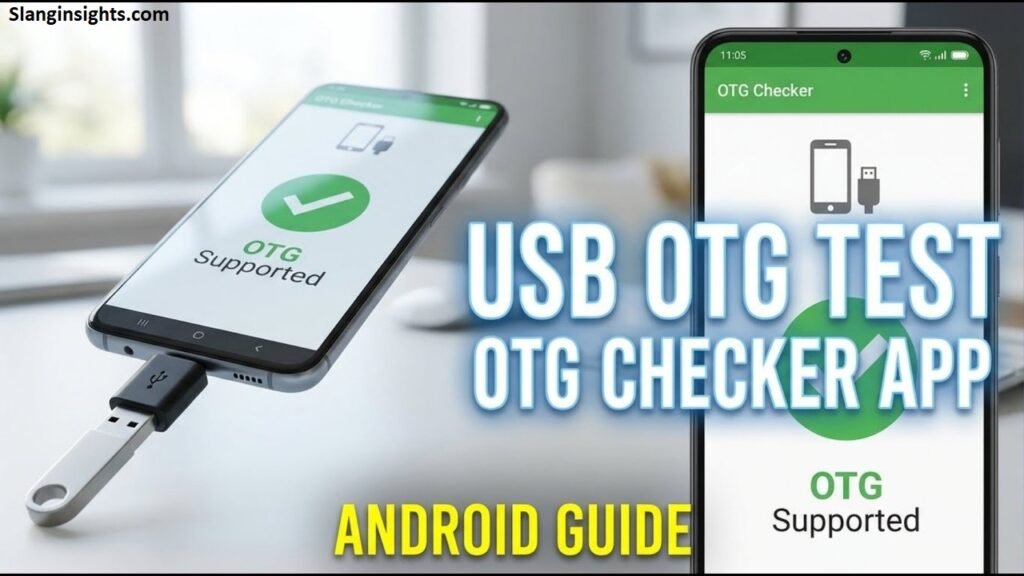
- Check if your phone supports OTG. Easiest way? Search “[your phone model] + OTG support” on Google. Or just download a free app called “USB OTG Checker” from the Play Store — that’s what I used the first time, took about 10 seconds.
- Buy the right cable or adapter. If you have USB-C (most phones since 2018-ish), you need a USB-C OTG adapter. If you’re on an older Micro-USB phone, you need that version instead. I made the mistake of buying the wrong one once on Amazon because I didn’t double-check my port type. Wasted money, had to return it.
- Plug your device into the OTG adapter. Flash drive, keyboard, mouse, game controller — whatever you’re connecting.
- Plug the OTG adapter into your phone. Your phone should automatically detect it. A notification usually pops up, or your file manager app opens automatically.
- Access your files. On most Android phones, you can browse the USB drive through the built-in “Files” app or “My Files” app (Samsung phones call it this).

Real Situations Where OTG Has Actually Saved Me
I’m not just listing random scenarios here — these are things that genuinely happened to me or people I know.
Transferring files without WiFi or cloud storage. When you’re somewhere with bad internet, OTG is honestly a lifesaver. No uploading, no waiting on slow uploads, just plug and done.
Connecting a keyboard to type faster. My sister uses an OTG adapter with a regular wireless keyboard dongle so she can type long messages on her tablet without the on-screen keyboard driving her crazy.
Using a USB mouse on Android. Sounds unnecessary until you’re trying to do something precise like editing a spreadsheet on a tablet. A mouse makes that so much easier.
Game controllers. A friend of mine plays mobile games with an actual Xbox-style controller connected through OTG. Way more comfortable than touchscreen controls for racing or shooter games.
Backing up photos when your phone storage is full. Instead of deleting precious memories, you can just dump them onto a flash drive directly from your phone.
Common Mistakes People Make With OTG (I’ve Made a Few Myself)
Buying the wrong adapter type. USB-C and Micro-USB are not interchangeable. Always check your actual port before buying.
Assuming all phones support it. Some budget or older phones simply don’t have OTG capability built in, no matter what cable you use. Check first.
Expecting it to charge your phone while transferring files. Regular OTG adapters usually don’t pass through charging power. There are some “Y-shaped” OTG cables that do both, but the basic ones generally don’t.
Forcing in a cable that doesn’t fit smoothly. If it’s not going in easily, don’t force it. You could damage the port. Double-check orientation and type first.
Confusing it with regular charging cables. Not every USB cable works for OTG purposes — it specifically needs to be labeled or designed for OTG functionality.
What About iPhones?
This is something people ask a lot, so I’ll mention it. iPhones don’t use the word “OTG” the same way, but Apple has something similar through Lightning-to-USB adapters or USB-C adapters (on newer iPhones with USB-C ports).
It works in a comparable way — letting you plug in flash drives or accessories — but Apple just doesn’t market it with the OTG label.
So Next Time Someone Texts You “OTG”…
Just look at the context. If they’re talking tech, cables, file transfers, or devices — they mean USB On-The-Go. If they’re texting casually about being busy or out somewhere, they probably just mean “on the go” in the everyday sense.
Honestly, once you understand USB OTG, it’s one of those features you wish you’d known about sooner. I went years without realizing my phone could basically replace a computer for quick file transfers.
If you’re dealing with a full phone storage situation, slow WiFi, or just want to use a real keyboard or mouse with your phone or tablet, grabbing an OTG adapter is genuinely one of the cheapest, most practical tech purchases you can make.
Mine cost less than a coffee and has saved me more than once.
FAQ’s
What does OTG mean in a text from a girl or guy?
It usually means “On The Go” — they’re busy, out somewhere, or replying quickly while doing something else. It’s not gender-specific; both guys and girls use it the same way.
Is OTG always a positive or casual term?
Yes, it’s generally neutral and casual. It’s just letting you know they’re occupied or moving around, not necessarily ignoring you.
Can OTG mean something other than “On The Go” or “Off The Grid”?
Rarely, but context matters. In tech conversations, OTG can also refer to “On The Go” USB cables (a hardware term), which is unrelated to texting slang.
How do I reply when someone texts me “OTG”?
Keep it short and easy to respond to, like “No worries, talk later!” since they’ve signaled they’re busy or in transit.
Is OTG used more in texting or social media?
It’s common in both, but you’ll see it most in casual texting, group chats, and quick social media replies where brevity matters.
Conclusion
OTG is a simple but versatile texting abbreviation, most often meaning “On The Go” and occasionally “Off The Grid,” depending on context. If someone uses it while heading out or mid-errand, they’re letting you know they’re busy or mobile.
If they use it before disappearing for a while, they’re signaling they’ll be unreachable.
Understanding texting slang like OTG helps you communicate more naturally in casual conversations, especially with friends, coworkers, or family who text in shorthand.
As with most abbreviations, context is key — pay attention to the surrounding conversation to know exactly what someone means.
Next time you see “OTG” pop up in a text, you’ll know exactly how to interpret it and respond appropriately, keeping your conversations smooth and efficient.